



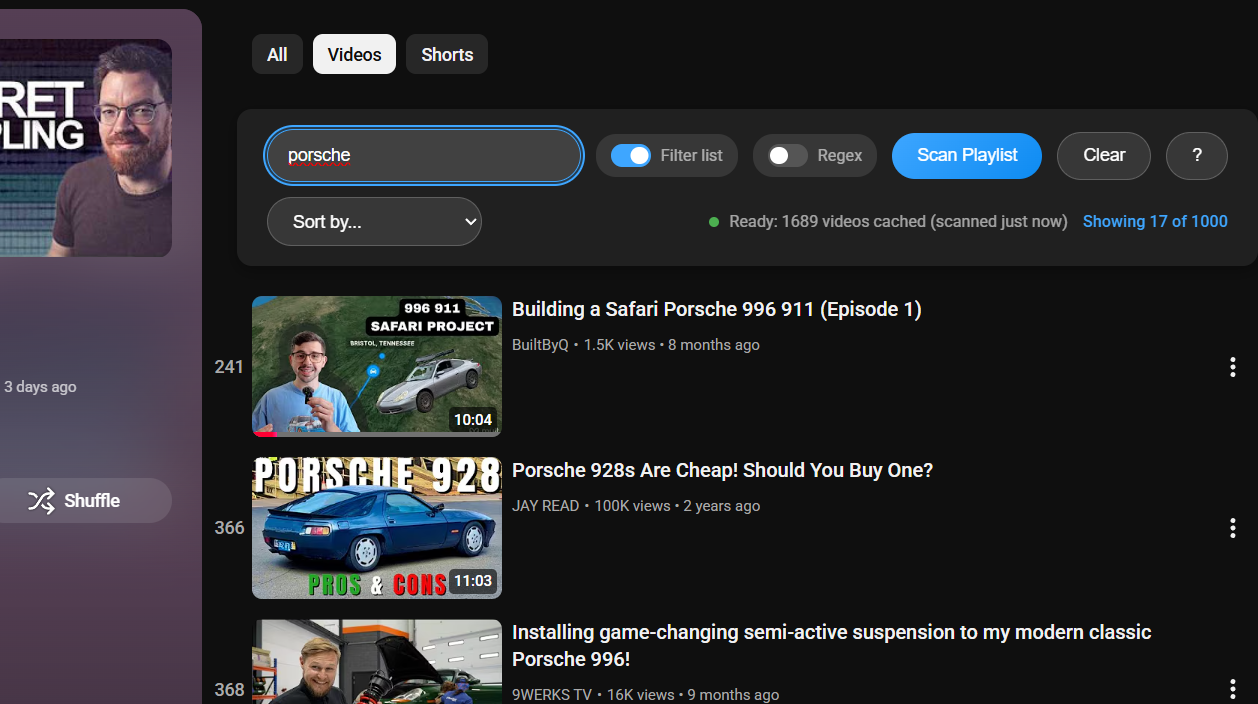
YouTube's Watch Later playlist has no search. LaterLens fixes that — instant search by title or channel, sorting, and cached results. Uses DOM scraping with programmatic scrolling to index videos (YouTube's API doesn't expose Watch Later). Vanilla JavaScript, no build step, no dependencies.
Free. No paywall. No IAP. No subscription. No ads. No data gathering. Use this extension if it'll be helpful to you.
Published to the Chrome Web Store — March 10, 2026.
Changelog
v1.4.0 — August 24, 2026
Added
- Search results are ordered by how well they match — whole words in the title first, then partial words, then videos found only through their channel name. Addresses "includes unrelated videos when searching for a specific word": a search for
musicno longer leads with every video from a channel called "Lofi Music Radio" - Channel-only matches are labelled with a small "channel match" tag, so a result whose title has nothing to do with the search explains itself
- Titles only toggle — ignore channel names entirely when searching
- Quick refresh — scanning again stops once it reaches videos already cached and keeps the rest, so a routine refresh reads only what you have added since the last scan. Status reports e.g. "Updated: 12 new videos (1,190 kept from cache)". A Full rescan toggle re-indexes everything. Quick refresh needs YouTube's own Date added (newest) order so the new videos are at the top: LaterLens reads the playlist's sort control, and if you keep the playlist in another order it switches over for the scan and puts your order back afterwards — including if you stop the scan. If it can't drive the sort menu it runs a full scan instead, and if it ever can't restore your order it says which one to set back
- Filter by length — a length dropdown (under 10 min / 10–30 min / over 30 min), plus search syntax:
<10:00,>1:00:00, or a bare number for minutes (<20). Works on its own or with text, e.g.rust <20:00 - The playlist count is checked against your cache — if YouTube shows more or fewer videos than were cached, the status says so instead of leaving you to guess from the scan timestamp
- The toolbar remembers itself — Filter list, Regex, Titles only, the length filter and sort are restored the next time you open Watch Later
Changed
- Sorting no longer moves videos in the page; it positions them with flexbox
orderinstead. This keeps the playlist in the order YouTube expects, which is what broke removing a video from a sorted list - Scanning continues as soon as new videos appear rather than pausing a fixed 600–1200ms per scroll — noticeably faster on large playlists
- Sorting before a scan now says how many videos it actually sorted, instead of implying the whole playlist was sorted
- The Chrome Web Store link in the popup is driven by
STORE_URLinpopup.js(still blank — the link stays hidden until it is filled in)
Fixed
- The toolbar no longer breaks when a video is playing in the miniplayer. YouTube keeps the page you came from mounted while the miniplayer runs, so the document holds more than one playlist page; LaterLens was querying the whole document and could inject into — and count rows from — a page that was not on screen. Everything now scopes to the playlist you are looking at, and a toolbar left behind in a stale page moves itself across
- The toolbar no longer covers the playlist. On YouTube's current two-column layout it was injected as a sibling of the video list, which made it a flex child that stretched to the full column height and painted its background over everything behind it. It now sits inside the list, above the rows, and is styled so it can't stretch whatever the surrounding layout does
- The playlist's video count is read from more of YouTube's layouts, so the "cache has drifted" warning actually appears (it also no longer reads our own status line back as the playlist count)
- The toolbar now appears when you reach Watch Later from inside YouTube (sidebar, homepage, a video). Previously the extension only loaded if the playlist URL was opened directly or reloaded, because browsers load extension scripts on page load and YouTube navigates without one — so arriving from elsewhere left no toolbar at all
- Filtering now hides unavailable videos (deleted/private) instead of leaving them in the list
- Sorting or filtering could use a previous video's title/duration after YouTube recycled a row
- Help modal: focus now moves into the dialog, stays inside it, and returns to the help button on close; its key handler no longer lingers after the modal is dismissed by navigation
- The results dropdown described itself to screen readers as a list of options while containing a heading and a button; it is now a labelled region of links
- Ctrl+F no longer hijacks typing in YouTube's own search box, and a second press reaches the browser's own find
- A saved sort no longer triggers the "you only sorted the loaded videos" warning every time you open the playlist — that warning is for sorts you choose
- Leaving the playlist no longer leaves LaterLens' sort styling applied to YouTube's list
- A cache that fails to save (browser storage full) now says so instead of reporting the videos as cached
- Stopping a scan early now caches everything loaded up to that point instead of discarding it — a partial index survives the stop
- "Scan stopped early" status now reports the number of videos actually scanned; it previously showed the count from the *previous* cache (often
0, or an unrelated number) - Chrome Web Store link in the popup now works — it read
manifest.store_url, which is not a valid MV3 manifest key, so the button was never shown (setSTORE_URLinpopup.jsto enable it)
v1.3.8 — March 10, 2026
- Keyboard shortcut: Ctrl+F (Cmd+F on Mac) focuses the search box and intercepts the browser's native find dialog
- Help modal shortcuts table updated to list Ctrl+F
v1.3.7 — March 10, 2026
- Fixed: UI now re-injects automatically after YouTube theme switch (dark↔light) without requiring a page reload
v1.3.6 — March 10, 2026
- Scan progress banner: fixed to bottom of screen during scanning, always visible regardless of scroll position
- Banner shows live video count and a Stop button
- Stopping early shows amber warning in status bar: "Scan stopped early — N videos cached (results may be incomplete)"
v1.3.5 — March 10, 2026
- Toolbar is now sticky — stays visible as the page scrolls during scanning
- Stopping a scan early shows an amber warning: "Scan stopped early — N videos cached (results may be incomplete)"
- Warning clears automatically when a full scan completes
v1.3.4 — March 10, 2026
- Flipped toggle logic: "Filter list" is now opt-in (default off); overlay search is the default behaviour
- Updated help modal text to match new terminology
v1.3.3 — March 10, 2026
- Replaced checkboxes with toggle switches matching YouTube's aesthetic
- Renamed "Cache" → "Search" and kept "Regex" for clarity
v1.3.2 — March 10, 2026
- Improved manifest description
v1.3.1 — March 10, 2026
New
- Extension popup — click the toolbar icon to open Watch Later, visit the Chrome Web Store, or support on Ko-fi
- Ko-fi support link added to the help modal (? button)
Improved
- Cache mode result links now navigate in the same tab, using YouTube's SPA router for fast navigation (was opening a new tab)
Security
el()helper now blocks dangerous property names (innerHTML,outerHTML,srcdoc, event handlers)rel=noopener noreferreron all external result links- Content script
matchestightened toplaylist*only - Explicit
content_security_policydeclaration in manifest
v1.3.0 — February 11, 2026
Performance
- Extract video data once before sorting/filtering instead of per-comparison DOM queries
- Batch DOM reordering via DocumentFragment for a single reflow on sort
- Lighter
escapeHtmlusing string replacement instead of DOM element creation - Shorter debounce (100ms) for cached search; 200ms retained for DOM filtering
Reliability
- Fisher-Yates shuffle for unbiased randomization
- Retry limit (20 attempts) on UI injection to prevent infinite loops
- Reset original order on rescan so "Original Order" sort stays accurate
- Precise Watch Later URL check using URL parser instead of
string.includes - URL sanitization in results overlay to prevent XSS from corrupted cache data
- Event listener cleanup on UI removal prevents accumulation across navigations
Compatibility
- MutationObserver replaces fixed-interval polling for DOM readiness detection
- Improved element visibility check handles
position: fixedelements - Proper
readyStatehandling covers bothinteractiveandcompletestates
v1.2.3 — January 18, 2026
- Added sorting status spinner for better UX
- Fixed missing 16px and 48px icons
- Optimized sorting logic (async) to prevent UI freezing
v1.2.2 — January 18, 2026
- Fixed duration sorting issue
- Updated selectors to support modern YouTube
badge-shapeelement
v1.2.1 — January 18, 2026
- Fixed "Extension context invalidated" error on reload
- Added safe storage access with error handling
v1.2.0 — January 18, 2026
- Cache search mode: search cached data instantly without rescanning
- Results shown in clickable overlay with video links
- Cache toggle enabled by default for faster UX
v1.1.1 — January 18, 2026
- Added quoted search for whole-word/phrase matching
"AI"matches only "AI", not "again"
v1.1.0 — January 18, 2026
- Added sorting: Channel, Title, Duration, Shuffle
- Added regex search toggle
- Two-row UI layout
v1.0.2 — January 18, 2026
- Improved scanning for large playlists (switched to instant scroll)
- Increased retry iterations and wait times
v1.0.1 — January 18, 2026
- Fixed header selector - YouTube hides
ytd-playlist-header-renderer