



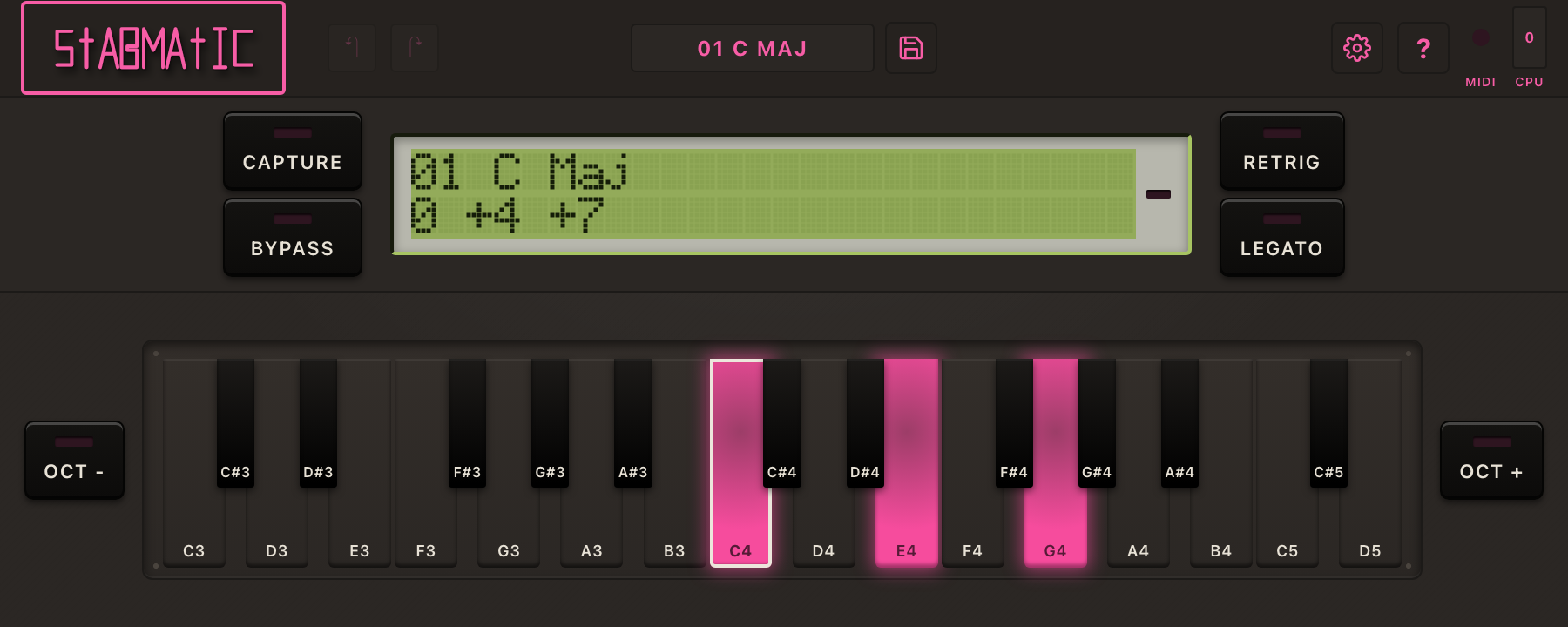
Why did you?
Our general philosophy in product fit and design revolves around getting the sound and function of our studio hardware without having to patch and route everything into the DAW. Bluntly: we're lazy, but like the capabilities of the hardware we've collected but can't bother to use. This one came to me while cleaning up the studio to make room for more gear that I won't use and I was thinking about how fun the Chord Memory on the MC-909 is. After spec'ing out what I was thinking of and getting a rough draft working, it turns out that there's a ton of other options out there. 🤦♂️
Why should I?
Honestly? I don't know. Most DAWs already have this and a strict MIDI effect is a pain to set up with MIDI routing and all. However, if you use Cakewalk, you're going to love this! You have no choice but to love this. You love! Cakewalk has no alternative to this. For all the built in Chord/Multi-note/Note Stack/Chorderize MIDI effects, we offer something a little bit beyond what's built-in in each case. Is it worth the faff? You decide.... for FREE!!
Huh? Wha?
Le'sigh - Roland put Chord Memory on the Alpha Juno in 1985 and again on the MC-505 in 1998, and everybody stopped adding it by the mid-2000s. It was replaced by the "smart chord" plugin — the kind that knows what key you are in, quantises to a scale, and substitutes a chord it thinks you meant. Stabmatic is not that. It is a MIDI effect that holds one chord form and slams it onto whatever note you play, unaltered.
What a chord form is
A set of semitone offsets. Nothing else. The form does not know what key it is in, because it has no concept of key; it is a shape, and the shape does not bend. Play a note a semitone higher and every note in the form moves a semitone with it. That rigidity is the whole product — it is what makes parallel harmony sound the way it has sounded in house, techno, rave and jungle for thirty years, and it is precisely the thing a scale-aware plugin can't do.
Two ways in, one engine
- Capture — the Alpha Juno approach. Arm it, play a chord, let go. That is now the working form. No menus, no browser, no save dialog standing between you and the next idea.
- Library — the MC-x0x / Fantom approach. 64 factory forms, transcribed verbatim out of the Roland manual rather than approximated, plus a user library you can fill up as far as you like and a pad grid for editing a form by eye.
Both feed the same transposition engine, so a captured form and a factory form behave identically. An EDIT light tells you the working form has changes you have not saved, which is the one piece of state a performer actually needs to see.
One chord at a time
Incoming MIDI is reduced to a single mono voice before the form is expanded, on last-note priority — so the plugin plays one chord, not a pile-up of every note still under your fingers. Retrigger gives you the stab; Legato lets a returning note slide without re-articulating. Every non-note event passes straight through untouched, velocity included, because a MIDI effect that eats your CCs is a MIDI effect you will uninstall.
Five parameters
Exactly five things are exposed to the host for automation. Everything else — the working form, the user library, favourites, the theme — is plugin state, not a knob for your DAW to fight you over. It runs as VST3 and CLAP on Windows and macOS, and LV2 on Linux. There is no standalone build, because a MIDI effect outside a host has nothing to send MIDI to.
Changelog
v0.2.26 — October 10, 2026 — macOS 10.15 and 11 minimum, maker code corrected
Changed
- The macOS minimum is lower: macOS 10.15 on an Intel Mac, macOS 11 on an Apple Silicon Mac. It was macOS 15 Sequoia. The installer still refuses anything older than that, and now also checks that the plugin inside was built for it. (Owner decision O47, 2026-10-08.)
- Stabmatic now identifies itself to hosts with the company's maker code. Every build up to 0.2.22 carried a one-letter case typo in it, so a host saw Stabmatic as coming from a different maker than every other Knives on Strings plugin. A host that scanned one of those builds will list this one as a new plugin, and a project saved with one will not find it. No such build ever left the development machine, so nobody is affected; it is corrected now because after the first release it could never be.
Development
- Stabmatic syncs shared files with the VST Builder boilerplate: a provenance record, a drift check and a repo-hygiene step in its gate, and newer hooks and scripts taken from the boilerplate.
v0.2.23 — October 9, 2026 — report a bug from inside Stabmatic
Added
- Report a bug without leaving the plugin. Open the About box and press *Report a bug*. A form opens in your browser with Stabmatic's version, its format and your host already filled in, and what you send lands on Stabmatic's issue tracker. If the form can't be reached, Stabmatic shows you its address so you can copy it instead.
- You decide whether Stabmatic helps us improve it. The first time it opens, Stabmatic asks once whether it may send anonymous usage data — never audio, never MIDI, never anything personal. Say no and no usage data is sent. You can change your mind at any time in Settings. Reporting a bug works either way.
v0.2.8 — September 18, 2026 — a real macOS installer
Added
- A macOS installer. A signed, notarized
.pkgthat installs the VST3 and the CLAP, lets you pick which, and opens without a Gatekeeper warning. It is a universal binary, so it runs natively on both Apple Silicon and Intel Macs. Ported from XCent's and Mample's installer, which have shipped this way. - Packaging the plugin no longer breaks the plugin. Signing used to rewrite the bundles in the build directory, and the next build invalidated that signature, leaving plugins macOS refused to load. Nothing you installed was affected -- the packaged copies were always fine -- but a build after a packaging run was not.
- The licence texts now install with the plugin, to
/Library/Application Support/Knives on Strings/Stabmatic/. The installer's licence page said they did; on macOS they only sat inside the disk image next to the installer, so anyone who kept just the installer never got them.
Changed
- macOS 15 Sequoia is now the minimum. The installer refuses to run on anything older rather than installing a plugin that will not load.
Fixed
- The build no longer breaks on a fresh clone on macOS. Configuring a clean checkout failed while copying JUCE's WebView bindings into a directory that nothing had created yet.
- The UI build no longer depends on its own output, which stalled every build after the first one with a dependency cycle.
- The uninstaller now removes the LV2 build and the standalone app if an earlier release left either behind, and clears their quarantine flags.
- The README inside the disk image reads properly. Three arrows in it were mangled bytes showing as CJK characters, and its Gatekeeper instructions are now only shown when they actually apply.
v0.2.0 — September 16, 2026 — the first build meant for a tester
Added
- One key in, a full chord out. Hold any note and Stabmatic plays a stored voicing transposed rigidly to it. Move up a semitone and every note moves a semitone. It never second-guesses you: no key, no scale, no substitution.
- The Roland MC-909's 64 chord forms, transcribed from the manual with their names and their quirks intact. Forms 29 to 64 are the arpeggio-voiced ones and are marked so in the display.
- Capture. Arm it, play a chord, let go. That shape is now the one under your finger. It is yours immediately, saved or not.
- Your edits survive a reload. Close the project with a captured or edited chord and it comes back exactly as you left it, whether or not you saved it to the library. Loading a different form discards the edit, and one undo brings it back.
- A library of your own with no slot limit: save as new, overwrite, rename, delete, and star the ones you reach for.
- A browser that filters by chords, arpeggio, your own, favourites, and by quality: major, minor, seventh, augmented, diminished, suspended.
- Retrigger and Legato switches. Retrigger decides whether every note re-attacks when you change key, which is the difference between stabs and pads. Legato returns you to a key you are still holding when you release a later one, the way a mono synth does.
- A piano-style editor. Click the keys to build a chord by hand, page the window with the octave buttons, and watch the keys light as you capture.
- A dot-matrix display with four skins: stock green, teal, blue OLED and amber. It shows the form, whether you have modified it, the arpeggio badge and the host tempo.
- Dark and light themes, and window scaling from half size to double.
- A first-run note telling you how to route MIDI out of Stabmatic in your particular DAW, because every host does it differently.
Fixed since 0.1.13
- The panel was cut off in some hosts. On a display set above 100 per cent, and in hosts that scale plugin windows themselves, the right edge and the bottom of the panel fell outside the window: half a button, a sliced keyboard. The panel now scales to fit whatever window it is given, the way a photograph of a hardware unit keeps its shape. A window larger than the panel centres it rather than stretching it.
- Typing a chord form's name into a host's parameter box picked the wrong form, always the next one up. Type the name of form 1 and you got form 2. Hosts that show a parameter as text convert it back and forth, and the conversion back was reading the printed number as if it counted from zero.
Behaviour worth knowing
- Velocity and everything else pass straight through. Sustain, pitch bend, aftertouch, program change and system exclusive are your synth's business, not ours. Velocity applies to every note of the chord.
- One chord at a time. Overlapping notes in a clip replace each other rather than stacking, which is what the hardware does and what keeps a busy MIDI part from turning into a wall.
- No stuck notes. Every path that stops the plugin, including bypass and a panic from the host, releases what it was holding.
- Stabmatic loads as an instrument, not a MIDI effect, because Ableton Live will not load third-party MIDI-effect plugins at all. You put it before a synth and route its MIDI output there.
Not yet, and honestly
- Reason is not supported. It cannot route MIDI out of a plugin, so there is nothing to do about it from this end.
- No AU on macOS yet. macOS gets VST3 and CLAP. AU waits until the format question can be tested on an actual Mac rather than guessed at.
- There is no standalone version and there will not be one. A MIDI instrument has nothing to do outside a host.
- Two behaviours are provisional until they can be checked against real MC-909 hardware: what happens when the chord form changes while notes are held, and what happens to chord notes that fall off the end of the MIDI range. Today they hold, and they are dropped, respectively.
- Nothing phones home in current builds. The usage reporting and the bug reporter are compiled out entirely, so there is no toggle to find and no request to block. If that changes, it will be opt-in, it will be anonymous, and it will never include your audio, your MIDI or anything about you.