



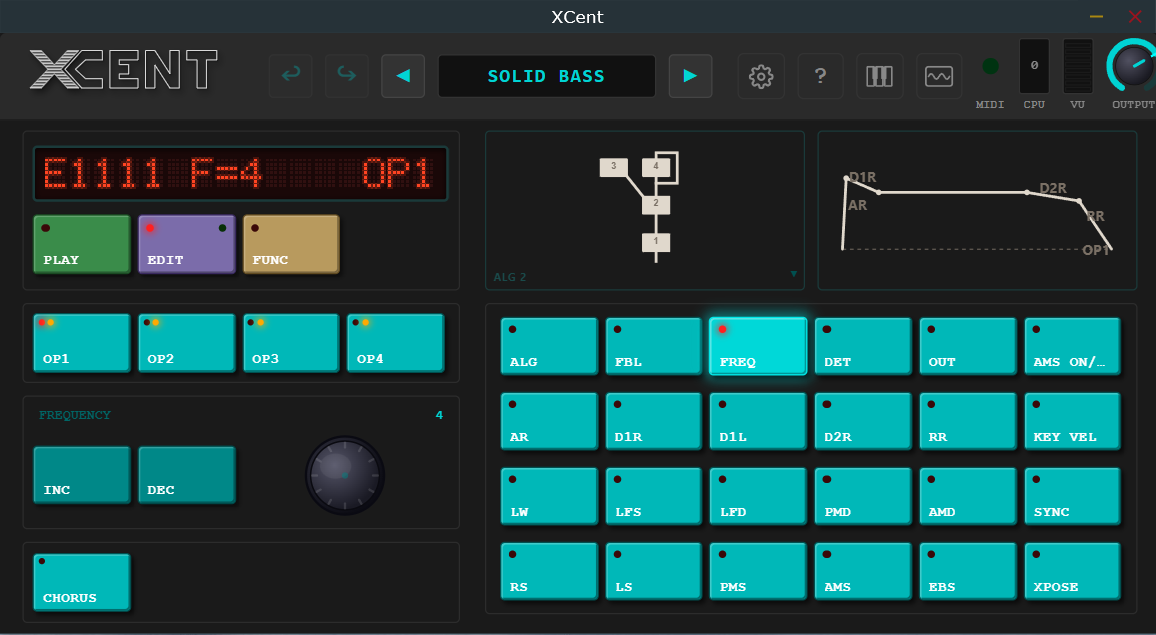
The Yamaha DX100 emulation nobody asked for, built exactly the way nobody bothered.
Somewhere in a landfill — or maybe your aunt's basement — there's a Yamaha DX100. It ran on six C batteries (because the DC port has cracked solder joints), had a dot-matrix LCD the size of a postage stamp, and produced FM tones so aggressively digital they looped back around to character. It was not prestigious. It did not care.
XCent is that synth, without the batteries, without the 2.7kg of drity black plastic, and with significantly less explaining to do at airport security.
What makes XCent different from the other FM plugins you already own
- Emulates the YM2164 OPP chip specifically — not its more famous cousin, not a generic FM engine wearing a costume. The YM2164 has quirks. We kept them.
- Runs the FM engine at the chip's native 55,930 Hz sample rate, then resamples properly. Because running it at 44.1kHz and calling it authentic is the plugin equivalent of putting a photo of a burger on the box.
- DAC quantization, aliasing, and a sluggish reconstruction filter are all present and accounted for. This is not a bug section. This is the sound.
- 192 factory voices sourced straight from the original ROM plus velocity imported from the FB-01.
- All 8 algorithms, full 8-voice polyphony, and operator-level control for when you've decided this is your personality now.
XCent doesn't try to be a DX7. The DX7 doesn't try to be a DX100. We're all better for it.
All for less than the shipping cost on a broken one from eBay.
Changelog
v0.15.76 — October 30, 2026
Improved
- The patch browser remembers where you were: it reopens on the same bank, scrolled to the sound you are playing.
- XCent now tells your host how long each sound's tail really is, so bounces include the whole release.
- Smoother behaviour under heavy MIDI in ROM mode.
Fixed
- Sounds with a slow release now fade out fully instead of stopping 3 seconds after you let go, and a note held in ROM mode no longer goes silent.
- Saving a bank can no longer leave it damaged if the computer or your host crashes in the middle of the save.
- Very fast playing on the on-screen keyboard can no longer leave a note stuck.
v0.15.75 — October 28, 2026
New
- The level meter is now stereo, with a column for the left channel and one for the right, so you can see the chorus spread the sound.
- Settings shows where your own patches are saved, with a button to open that folder.
Improved
- In the patch browser, the DX100, FB-01 and My Banks groups can each be collapsed and expanded.
- The licence agreement in the Windows and Mac installers now reads cleanly instead of wrapping awkwardly.
v0.15.74 — October 27, 2026
Fixed
- Fast repeated notes, trills and chords no longer click. Notes now take turns on all eight voices, as on the DX100, so a released note rings out under the next one instead of being cut off.
- In mono mode, notes played legato change pitch smoothly without restarting the sound, as on the DX100.
- Big chords that arrive all at once, for example from a sequencer, no longer come out garbled.
- In ROM mode, the first moments after the original firmware starts, or after a bank file loads, no longer buzz or go silent.
- Editing a sound while a chord is held no longer changes the attack of the held notes.
v0.15.73 — October 26, 2026
- Maintenance release -- no changes you'll notice.
v0.15.72 — October 26, 2026
New
- The DX100's factory sounds are grouped under their own heading in the browser.
- MIDI CC11 (Expression) can now control the volume, the level of the carriers, the level of every operator, or nothing.
Improved
- Pitch bend is smooth, as on the DX100, instead of moving in semitone steps.
- The highest and lowest keys fold back by an octave, as they do on the DX100.
- Editing a sound no longer changes the level of a note you are holding, as on the DX100; the next note takes the change.
- Download files now follow one naming pattern on every platform: product, version, system and processor type.
Fixed
- The browser's Favorites and Recent buttons switch off again with a second click.
- If you have not agreed to share usage data, XCent keeps no identifier and deletes any it stored before.
v0.15.71 — October 24, 2026
Improved
- Privacy settings now have their own Privacy tab in Settings.
v0.15.70 — October 24, 2026
Fixed
- Sounds no longer change tone or level abruptly between C and C# as you play up the keyboard. Key level scaling now changes a little every three notes, exactly as on the DX100 and the DX21.
v0.15.69 — October 23, 2026
- Maintenance release -- no changes you'll notice.
v0.15.68 — October 23, 2026
- Maintenance release -- no changes you'll notice.
v0.15.67 — October 23, 2026 — FB-01 velocity mode retired
Improved
- To play a factory sound the way the Yamaha FB-01 plays it, choose it from the FB-01 section of the patch browser. Those sounds respond to how hard you play exactly as on an FB-01.
- Factory patches in banks 100 to 400 and A to D now always respond as on a DX100. The FB-01 velocity mode setting is gone; if you had it on, these patches now play as a DX100 plays them.
- Projects saved with FB-01 velocity mode on open with the DX100 response. Patches you saved into your own banks while it was on keep the response they were saved with.
v0.15.66 — October 23, 2026
- Maintenance release -- no changes you'll notice.
v0.15.65 — October 23, 2026
New
- The Yamaha FB-01's 240 factory sounds are now in the browser, in five banks of their own.
- XCent can tell you when an update is available. It checks weekly by default, sends only the product name, and is set in Settings.
Improved
- FB-01 sounds now play with the FB-01's own velocity and keyboard response. Sounds you imported from an FB-01 earlier may sound louder, especially sounds with several audible layers.
Fixed
- A project saved on an FB-01 sound reopens on that sound.
- A project saved on a library patch no longer reopens as modified.
v0.15.64 — October 23, 2026
Improved
- Importing a bank from an FB-01 now keeps all 48 voices, and 32-voice DX21 and TX81Z banks keep all 32, instead of being cut short.
- Mac: the installer now also installs the licence texts.
- Each download now comes with a checksum file, so you can check it arrived intact.
v0.15.63 — October 23, 2026
New
- The Windows Standalone supports ASIO audio devices again. Choose ASIO as the driver type in Settings, then your audio interface.
Fixed
- TX81Z mode no longer applies a pitch envelope. The TX81Z has none, so a patch now plays at a steady pitch there, whatever its pitch envelope settings.
- A program change sent right after a bank over MIDI now plays the new sound, not the one the bank replaced.
- A second copy of a RAM bank now gets its own name ("User Bank A 2") instead of repeating "User Bank A".
v0.15.62 — October 14, 2026
Fixed
- In DX21 and DX11 modes, the pitch envelope now keeps moving after you release a key, as on the hardware, instead of stopping where it was. On a DX11, lifting the sustain pedal starts it too.
v0.15.61 — October 14, 2026
Improved
- FB-01 velocity mode now responds as an FB-01 does: medium velocity sounds as on the DX100, harder playing is louder and brighter, softer playing quieter and darker.
- FB-01 bank imports keep each operator's keyboard level scaling.
Fixed
- TX81Z banks and single patches now load from, and send to, a real TX81Z correctly. Operators 2 and 3 were swapped, and banks were cut to 16 voices.
- Factory patches sent to a DX21, DX11 or TX81Z no longer carry a wrong pitch envelope setting.
- A library bank used by a RAM bank can no longer be deleted. A RAM bank whose bank is missing gets its factory sounds back.
v0.15.60 — October 13, 2026
Fixed
- Single-voice SysEx files, and patches sent to XCent over MIDI, now load with their own pitch bend range, poly/mono, portamento and foot volume settings. Before, these were read in the wrong order.
- XCent's single-voice exports now write these settings the way a DX100 reads them.
- Bank files now load poly/mono, portamento mode and chorus correctly. The factory patches Mono Bass, Mono Lead and Mono Sax now play mono, with fingered portamento, as on the DX100.
- Exported patches keep the foot switch set to sustain instead of switching the sustain pedal off.
- DX100 single-voice files are no longer mistaken for DX21 patches with chorus switched on.
- Projects saved with earlier versions keep their patch settings. A project left on an unedited Mono Bass, Mono Lead or Mono Sax picks up the corrected mono setting.
v0.15.59 — October 13, 2026
Fixed
- SysEx files you put in your Library folder are now imported the next time XCent starts, instead of deleted. A message says how many were imported, and your files are left as they are.
- TX81Z single-voice exports can now be read back by XCent.
- DX21 bank exports now keep each patch's chorus and foot volume settings.
v0.15.58 — October 13, 2026
Fixed
- Opening a SysEx bank file now imports the whole bank as a bank of its own, named after the file. Before, only its first patch was kept.
- Opening a SysEx file now tells you when it can't be read or holds no patches XCent understands, and a bank with more than 24 patches says how many were left out.
- Bank actions tell you when they fail: new bank, rename, delete and assigning a bank to a RAM bank. A bank received over MIDI that couldn't be saved is reported too.
- My Sounds no longer lists its empty slots.
- A TX81Z single patch now imports as one patch with its own name.
v0.15.57 — October 13, 2026
Fixed
- Save As now tells you when it can't save, and no longer marks the patch saved if it wasn't.
- Save As waits until the patch is saved before it closes, and saves to My Sounds straight away. Before, Save could do nothing until you picked a destination.
- Opening a single-patch SysEx file now tells you when it couldn't be added to My Sounds, for example because My Sounds is full.
v0.15.56 — October 12, 2026
New
- Keyboard shortcuts: Ctrl+O (Cmd+O on the Mac) opens the patch browser, Ctrl+K (Cmd+K) shows or hides the on-screen keyboard, the Left and Right arrow keys step through patches, and F1, F2 and F3 press PLAY, EDIT and FUNC.
- The shortcuts stay out of the way while you type a name or a window or menu is open, and the arrows while a knob or parameter is selected.
Fixed
- Store in the patch browser no longer says a patch was saved when it could not be. It is greyed out for factory banks and for the All patches view.
- When a patch can't be stored, renamed, deleted or copied, XCent now tells you why, for example that the bank is a protected factory bank.
v0.15.55 — October 12, 2026
Fixed
- Renaming, deleting and copying patches in your own library banks now works, and the change is kept. Before, it looked done but the bank was unchanged.
- Saving the current bank as a SysEx file now saves the library bank your patch came from. Before, it saved factory bank 100 instead.
- Cmd+S saves on the Mac, and Cmd+Shift+S opens Save As.
- Redo with Ctrl+Shift+Z (Cmd+Shift+Z on the Mac) now works, and shortcuts work with Caps Lock on.
- The manual's list of keyboard shortcuts now shows only the ones that work.
v0.15.54 — October 12, 2026
Fixed
- Ctrl+S now really saves a patch back to your own library bank. Before, it looked saved but the change was gone next time.
- Saving, renaming or deleting a patch in RAM banks A to D now lasts. Before, changes over the factory sounds there were lost when XCent closed.
- Your first change to a RAM bank now copies it into a new bank of your own, User Bank A (B, C, D), which keeps your changes. The factory sounds stay untouched in the library.
- A sound sent to XCent over MIDI is now kept even when XCent's window is closed, so your project saves it. A bank sent over MIDI is kept in RAM bank A for next time, window open or not.
v0.15.53 — October 11, 2026
- Maintenance release -- no changes you'll notice.
v0.15.52 — October 11, 2026
- Maintenance release -- no changes you'll notice.
v0.15.51 — October 11, 2026
- Maintenance release -- no changes you'll notice.
v0.15.50 — October 11, 2026
- Maintenance release -- no changes you'll notice.
v0.15.49 — October 11, 2026
Fixed
- Sending XCent a voice or a bank over MIDI while it plays no longer risks a glitch or dropout in the audio.
- Closing XCent's window while a file dialog is open is now safer.
- On Windows, leftover interface data folders from older versions of XCent are now cleaned up once nothing is using them.
v0.15.48 — October 10, 2026
Fixed
- On older Macs (macOS 10.15 to 11), some of XCent's knobs and switches could move on screen without changing the sound. They now work on every macOS version XCent supports.
v0.15.47 — October 10, 2026
- Maintenance release -- no changes you'll notice.
v0.15.46 — October 10, 2026 — The whole window in Ableton Live
Fixed
- In Ableton Live on Windows, with Auto-Scale Plug-In Window switched on and the display set above 100 %, XCent's window showed only the top-left part of the interface. It now shows all of it, at any interface size.
- XCent now opens straight at your saved interface size, instead of opening small and then jumping to it.
v0.15.44 — October 10, 2026 — FB-01 sounds import correctly
Improved
- FB-01 velocity mode now also gives factory patches the FB-01's attack response where the FB-01 sound has one: play harder and the attack gets faster, softer and it gets slower.
- Whistling now gets its FB-01 velocity response in FB-01 velocity mode.
Fixed
- Importing a Yamaha FB-01 bank now brings in its real sounds (the first 24 of its 48). Before, the voices came in scrambled, and many were silent.
v0.15.43 — October 10, 2026 — Factory patches play like a DX100
Improved
- FB-01 velocity mode is now off by default, so factory patches respond to velocity exactly like a DX100. It has been switched off once for everyone; turn it back on in Settings, Sound, Velocity Mode.
- The tour has a new step that explains FB-01 velocity mode and lets you turn it on, so it runs once more after this update.
Fixed
- FB-01 velocity mode gave most factory patches the wrong velocity response; IvoryEbony, for one, lost its brightness when played softly.
- FB-01 velocity mode now gives each factory patch the response of the same sound on the Yamaha FB-01. Patches the FB-01 lacks keep their own.
v0.15.42 — October 10, 2026 — Attacks match the DX100
Fixed
- Attacks now match the DX100: many voices, such as IvoryEbony and Hard Brass, no longer start slow or dull.
v0.15.41 — October 9, 2026
- Maintenance release -- no changes you'll notice.
v0.15.40 — October 9, 2026
- Maintenance release -- no changes you'll notice.
v0.15.39 — October 9, 2026 — Release notes written for players
Improved
- These release notes are new: short, plain-language notes about what changed for you. They replace the developer changelog in the Windows installer, the Windows zip and the Linux package.
v0.15.38 — October 9, 2026
- Maintenance release -- no changes you'll notice.
v0.15.37 — October 9, 2026 — A tidier header
Fixed
- The XCent logo now sits centred in the header, and the OUTPUT knob is no longer cut off at the right edge of the window.
v0.15.36 — October 8, 2026
- Maintenance release -- no changes you'll notice.
v0.15.35 — October 8, 2026
- Maintenance release -- no changes you'll notice.
v0.15.34 — October 8, 2026
- Maintenance release -- no changes you'll notice.
v0.15.33 — October 8, 2026 — Plain punctuation in the licence texts
Improved
- The licence agreement and the third-party notices now use plain punctuation, so they display cleanly in any text editor. Not a word of the terms changed.
v0.15.32 — October 8, 2026
- Maintenance release -- no changes you'll notice.
v0.15.31 — October 8, 2026 — The whole licence, up front
Improved
- Both installers now show the complete XCent licence agreement on their licence page, word for word the copy they install, instead of a summary.
v0.15.30 — October 8, 2026 — Mac release notes move online
Improved
- The macOS disk image now links to the release notes on the Knives on Strings website, which always cover the newest version, instead of carrying a copy.
v0.15.29 — October 7, 2026 — New contact addresses
Improved
- Our contact addresses have moved: [email protected] for support, refunds and general questions, [email protected] for privacy, and [email protected] for licensing.
v0.15.28 — October 7, 2026 — Undo keeps your edits
Fixed
- Undo and redo no longer rename the patch you are editing to INIT VOICE or reset its pitch envelope.
- A project saved after an undo no longer throws your edits away when it reopens: your edited patch comes back, still marked as modified.
- A project saved while you were building a sound from Init Voice now reopens with your sound, not the stored patch.
v0.15.26 — October 6, 2026 — The modified indicator stays honest
Fixed
- When a reopened project's patch no longer matches its bank slot, the modified indicator now stays on until you load, store or recall a patch, even if you close and reopen the window.
- When your DAW restores XCent with its window open, for example a preset or snapshot recall, the display now switches to the restored patch.
- Renaming a patch no longer marks your unsaved edits as saved, and the chorus switch, master tune and undo now mark the patch as modified in the project.
v0.15.25 — October 5, 2026 — Licence agreement completed
Improved
- The licence agreement now names the publisher, the governing law and the privacy policy, and states the refund policy: a full refund on request within 30 days of purchase.
- It also points to the right place to opt out of anonymous usage data: Settings > Appearance > Privacy.
v0.15.24 — October 5, 2026 — New audio options for the Windows Standalone
New
- The Windows Standalone now plays through Windows Audio, with shared, exclusive and low-latency modes, or through DirectSound.
- ASIO is no longer included in the Standalone; if you used it, choose your audio interface under Windows Audio. The VST3 and CLAP plugins are unaffected.
v0.15.21 — September 16, 2026 — Intel Macs and an honest manual
New
- On macOS, every format now runs natively on Intel Macs as well as on Apple Silicon.
- macOS 15 Sequoia or later is now required, and the installer checks your Mac before it installs anything.
Improved
- The macOS installer always puts each format in its standard folder, even when another copy of XCent exists elsewhere on the Mac.
- The manual now describes correctly where XCent keeps your data, how the banks are laid out and how to install.
- The manual in every download is printed fresh for that exact release.
Fixed
- macOS: the plugins and the Standalone now load on every Mac, not only on the one they were built on.
- The manual's eight FM algorithm diagrams now appear, instead of broken images.
- The Linux installer now sends you to the right place for support.
v0.15.20 — September 16, 2026 — The same look on every computer
Improved
- The screens XCent shows when its interface cannot start now use the same typeface as the interface.
- The Windows installer and zip now include the licence agreement, the third-party notices and the full third-party licence texts.
Fixed
- On computers without its fonts installed, the interface no longer falls back to Courier New and borrowed symbols: every font now ships with XCent.
- The About box now shows the version you actually installed; since 0.15.12 it always said 0.15.11.
v0.15.19 — September 8, 2026
- Maintenance release -- no changes you'll notice.
v0.15.18 — September 7, 2026 — Clean exits
Fixed
- Closing the Standalone, or quitting a DAW with XCent loaded, no longer ends in a crash report. Nothing was ever lost, but Windows logged an error.
- A project saved on a factory patch no longer shows that patch as modified when it reopens.
v0.15.17 — September 7, 2026 — Move your XCent folder
New
- For portable or multi-profile setups, the folder where XCent keeps your patches, preferences and log can now be moved; the manual explains how.
v0.15.16 — September 6, 2026 — CLAP hosts show the right values
Fixed
- CLAP hosts now show the right parameter values after loading a project. The values were always restored, but the host could keep showing the old ones.
v0.15.15 — September 6, 2026 — No false alarm on slow-opening windows
Fixed
- In DAWs that create the plugin window well before showing it, a working interface is no longer replaced by an error panel after about 8 seconds.
v0.15.14 — September 6, 2026 — No more white window
Fixed
- Opening XCent in a VST3 host could show a blank white window instead of the interface, with no way out. XCent now recovers on its own as the window opens.
v0.15.13 — September 6, 2026
- Maintenance release -- no changes you'll notice.
v0.15.12 — September 5, 2026 — Loads in Cubase and Nuendo
Fixed
- Windows: XCent now loads in Cubase, Nuendo and other hosts that use Steinberg's plugin loader, which refused it before.
- If XCent's sound engine is ever missing from its folder, the plugin still loads, stays silent and explains what is wrong, instead of failing.
v0.15.11 — May 17, 2026 — Report an issue from inside XCent
New
- A Report an Issue button in the About box opens a form for sending us a bug report.
- XCent sends anonymous usage data, tied to a random install ID and no personal data. The first-run tour asks, and Settings > Appearance > Privacy switches it off at any time.
- The macOS disk image includes an uninstall script that removes all four formats and keeps your patches unless you ask it to remove them too.
Improved
- All your preferences are now stored together in XCent's folder in Documents.
v0.15.1-rc2 — May 14, 2026 — Portamento like the hardware
Improved
- Portamento now glides at the DX100's speed, where it was about half as fast, and as on the hardware it only engages in mono mode when you play legato.
v0.15.0-rc2 — May 12, 2026 — Expression control and a Mac installer
New
- XCent responds to MIDI CC11 (Expression), scaling the volume on top of CC7 so you can ride expression separately.
- A macOS installer, on a disk image, installs the VST3, CLAP, Audio Unit and Standalone.
Fixed
- macOS: the Standalone no longer forgets settings made during a session when you close its window, and quitting no longer crashes.
- Issue reports sent from the Standalone are no longer rejected.
- When a project's patch has changed in its bank since you saved, XCent now shows it as modified, so you know the sound is not what the slot holds.
v0.14.0-rc1 — May 9, 2026 — A guided tour and tooltips
New
- A first-run tour walks you through modes, operators, editing, Modern view, Func mode and the patch browser. Replay it from Settings > Appearance.
- Hover over an Edit or Func button to see the parameter's full name and range.
- A setting opens Edit mode straight into Modern view, the new name for EZ mode.
Improved
- The Appearance settings are laid out in two columns, and the patch browser has clearer type and contrast.
Fixed
- Tooltips, right-click menus and the tag picker no longer drift off-screen at window scales other than 100%.
- The modified indicator now changes as soon as you edit a parameter.
v0.12.7 — May 7, 2026 — Breath control fixed
Fixed
- Breath-controller patches now respond to CC2 the right way round, quieter at low breath as on the hardware, even for notes played before any breath data.
- Cubase 15 and Nuendo 15 no longer show a blank white window instead of the interface.
v0.12.6 — May 5, 2026 — Better answers when the window stays blank
Fixed
- If a Windows "optimisation" tool has removed parts of WebView2, XCent now offers to reinstall it instead of showing a white screen.
- When a sandboxed host stops XCent's interface from saving its cache, XCent now says so and explains the workaround, instead of showing a white screen.
v0.12.5 — May 5, 2026 — Recovery from a blank window
New
- If the interface fails to load, XCent shows a panel explaining what went wrong, with buttons to open the log folder and clear the interface cache.
Improved
- The Windows installer clears the interface cache when it installs and uninstalls, so each version starts fresh. Your patches and settings are kept.
v0.12.4 — May 3, 2026 — Idle means idle
Fixed
- With a keyboard or clock sending MIDI, the CPU meter showed 30-50% while nothing played. XCent now rests at 0% when nothing is playing.
v0.12.3 — May 3, 2026 — Undo that remembers
Improved
- The mouse wheel now changes parameters 50% faster.
Fixed
- Undo keeps its full 50-step history, and redo works across several steps.
- The display no longer cuts off the names of patch-wide parameters such as pitch-bend range.
v0.12.2 — May 3, 2026 — Wheels and velocity
New
- The on-screen pitch-bend and mod wheels respond to the mouse wheel, and pitch bend springs back to the centre on its own.
Improved
- Velocity sensitivity now follows the DX100's own response. Soft notes on velocity-sensitive patches were up to 10 dB too quiet.
Fixed
- A voice received over MIDI SysEx shows its own name and comes back correctly when the project reopens.
- Loading a patch or using undo no longer confuses the modified indicator.
- The meters stop using processor time once they settle at zero.
v0.12.0 — April 29, 2026 — Pitch envelope done properly
Improved
- The pitch envelope now behaves like the hardware's: DX21, TX81Z and DX11 voices move through its stages at the hardware's rates, and DX100 and FB-01 voices jump straight to the first level.
- Pitch envelope levels now span the hardware's full four octaves either way.
v0.11.10 — April 27, 2026 — Closer to the hardware
Improved
- XCent's output level now matches a real DX100; it was about 3 dB quieter.
- LFO vibrato and tremolo depth now scale like the hardware's, audibly improving patches such as Good Vibes, Helicopter and Windbells.
v0.11.9 — April 25, 2026 — Mode letters on the display
New
- In Play mode the display shows a P before the patch name, as the DX100 does.
- A Modified Indicator setting chooses whether an edited patch is shown with a lowercase mode letter or an asterisk.
Fixed
- Patch-wide parameters in Edit mode, and the Func mode screen, now show the right mode letter.
v0.11.8 — April 21, 2026 — Scroll to edit
New
- Scroll over an EZ mode knob or slider to change it: hold Ctrl or Cmd for big steps and Shift for fine ones, or switch it off in Settings > Appearance.
- Smarter automatic tagging recognises more leads, brass, organs, percussion and strings.
Fixed
- The factory banks are now read-only everywhere: Store is disabled on them, with a padlock and a tooltip saying why.
- A 32-voice bank dump received over MIDI is now saved to bank A, and all of its names show in the browser.
v0.11.7 — April 19, 2026 — A Windows installer
New
- A Windows installer puts the VST3, CLAP and Standalone in place, for all users or just you, and installs Microsoft's WebView2 runtime if it is missing.
- It adds Start Menu shortcuts and an uninstaller that leaves your patches and settings alone.
v0.11.6 — April 21, 2026 — A clear message instead of a blank window
Fixed
- On Windows without a recent WebView2 runtime, XCent now explains what is missing, with a button to install it, instead of showing a blank window.
v0.11.5 — April 20, 2026 — Export to SysEx
New
- Save a voice or a 32-voice bank as SysEx for the DX100, DX21 or TX81Z.
- XCent suggests the format that keeps the most of the voice, and lists exactly what any other format would drop.
v0.11.4 — April 20, 2026 — Nothing lost in your library
Improved
- Your patch library is now stored in XCent's own format, which keeps every detail of a voice. SysEx files are still imported as before.
v0.11.3 — April 20, 2026 — More SysEx imports
New
- Import TX81Z single voices and banks, with their extra waveform and fixed-frequency settings.
- DX11 and DX21 voices are recognised automatically on import.
v0.11.2 — April 20, 2026
- Maintenance release -- no changes you'll notice.
v0.11.1 — April 20, 2026 — More even levels
Improved
- Factory patches now play at much more even levels across algorithms; a four-carrier patch could be about 12 dB louder than a one-carrier one.
Fixed
- Factory tags now show for the patches in the writable banks.
- A project saved on an untouched Init Voice reopens on its saved patch, and a fresh install always starts on the first factory patch.
v0.11.0 — April 20, 2026 — DX21 chorus and FB-01 voices
New
- DX21 chorus, modelled from hardware measurements, with a CHORUS button to switch it on for any patch.
- FB-01 bank import, including each operator's attack velocity sensitivity.
- Factory patches are numbered as on the hardware: 101-124 in bank 100, 201-224 in bank 200, and so on.
Improved
- Double-click the volume knob to reset it to 0 dB.
Fixed
- On some Windows setups OneDrive could stop the interface from starting; its cache no longer lives in Documents.
v0.10.0 — April 19, 2026 — The patch browser
New
- A patch browser with search and tag filters, across all 192 factory voices and your own banks.
- Every factory voice comes tagged as bass, pad, keys, lead, brass, bell and more, and you can add tags of your own.
v0.9.14 — April 6, 2026 — Bend and mod on screen
New
- On-screen pitch-bend and mod wheels beside the keyboard.
v0.9.1 — April 2, 2026 — FB-01 velocity
New
- FB-01 Velocity Mode gives 165 of the 192 factory voices per-operator velocity response taken from the Yamaha FB-01. Choose it or DX100 Classic in Settings > Sound.
v0.9.0 — April 1, 2026 — DCent becomes XCent
New
- The plugin is now called XCent, with a new logo. Projects that used DCent need their instances replaced.
Improved
- A new Stock LCD display style, and your display style now survives a restart.
- A fresh install starts on a factory patch instead of Init Voice.
Fixed
- Fast arpeggios no longer click.
v0.8.4 — March 29, 2026 — Accessibility and idle CPU
Improved
- Screen-reader labels, keyboard focus on knobs and sliders, and keyboard navigation inside dialogs.
- With no notes playing, XCent drops from about 17% CPU to under 1%.
Fixed
- Master Tune now shows its value on the display, and double-clicking a knob resets it to the patch's own value.
v0.8.0 — March 28, 2026 — Light mode and full MIDI
New
- Light mode, an OLED display style, tabbed settings, a window size setting and a CPU meter.
- Recall Edit and Init Voice buttons, and a MIDI receive channel setting.
- A Vintage and Modern engine switch; Modern bypasses the analog output stage for a cleaner sound.
- MIDI control of portamento, volume and mono or poly mode, matching the DX100's MIDI chart.
Fixed
- LFO delay now matches the hardware; it was about 20 times too fast.
v0.7.1 — March 26, 2026 — The right harmonics
Fixed
- Operator frequency ratios were wrong for 53 of the 64 settings, affecting most factory voices. They now match the DX100.
- A brighter output filter and corrected levels bring XCent within a fraction of a decibel of hardware recordings.
v0.7.0 — March 25, 2026 — An accuracy pass
New
- Save the current voice or bank as a SysEx file.
- Faster plugin scans: XCent skips its heavy start-up while a DAW is scanning.
Fixed
- All 192 factory voices had the wrong pitch and amplitude modulation sensitivity. Corrected.
- Velocity response, keyboard level scaling and operator levels now follow the DX100's own curves.
v0.6 — March 21, 2026 — First release
New
- Four-operator FM synthesis on a cycle-accurate emulation of the DX100's Yamaha YM2164 chip.
- All 192 factory voices, across eight banks, with SysEx import.
- The DX100's analog output stage, modelled.
- VST3, CLAP and Standalone formats.