



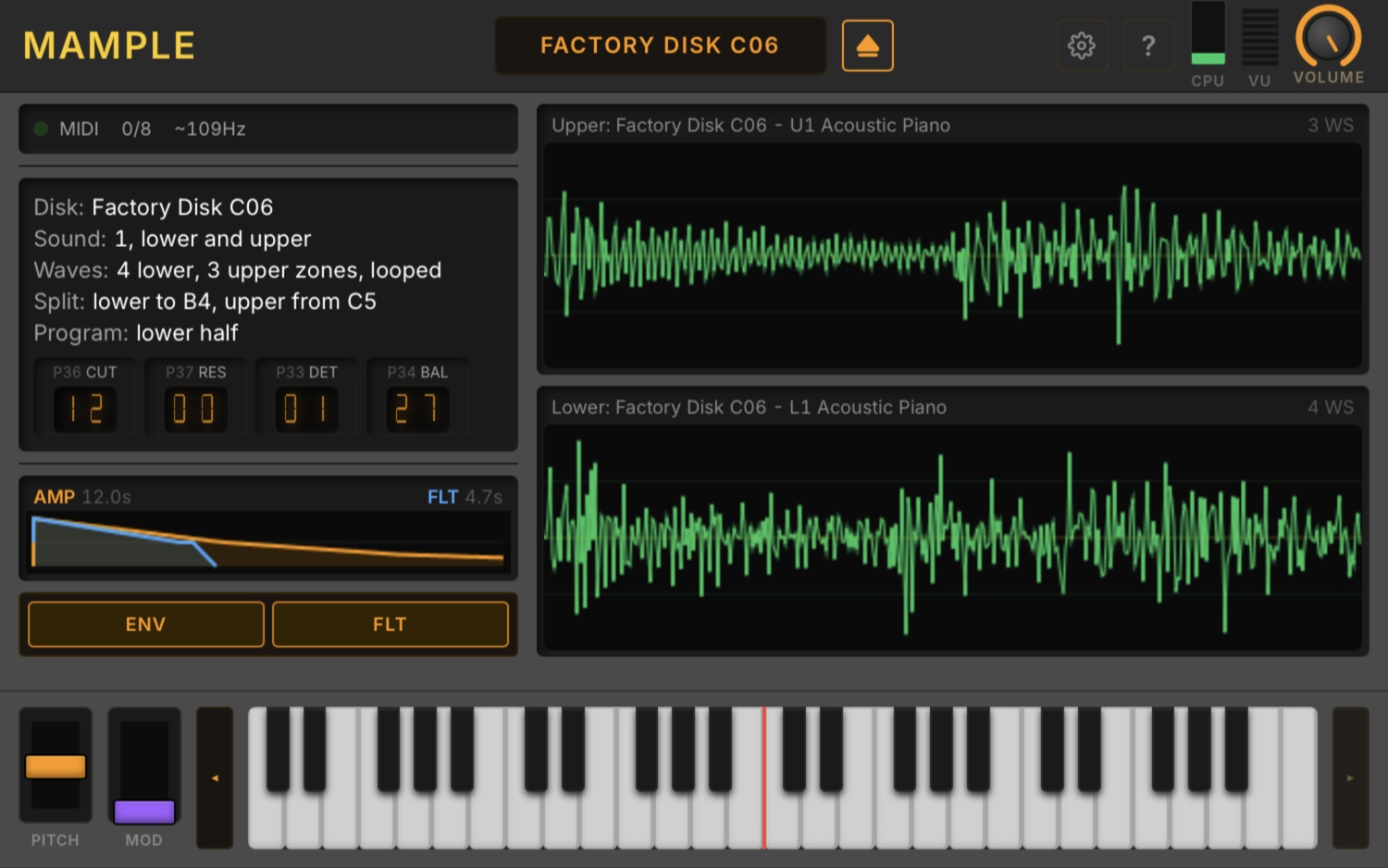
You don't need a 1MHz 6809 CPU to make something sound like a Mirage. You need the 32-oscillator ES5503 wavetable engine. You need the CEM3328 4-pole filter. You need the analog chain that gave every Mirage patch that unmistakable grit.
Mample gives you exactly that — the oscillator and analog chain, faithfully modeled, with none of the overhead of booting a 40-year-old operating system just to play a note.
Load your original Mirage sample disks. Mample reads the patches directly, feeds them through the real signal chain, and plays them back the way they were meant to sound. Authentic. Immediate. No OS required. No cheat sheet required. No therapy required.
It's the Mirage sound without the Mirage experience. For people who want the tone, not the trauma.
If you want the complete Mirage experience — interface quirks, firmware boot, existential parameter navigation and all — DSKlusion is waiting for you.
Disks not included. Obviously.
Changelog
v0.7.4 — October 27, 2026
- Fixed: The licence page in both installers shows the text in paragraphs, instead of breaking every line at 80 columns.
- Improved: The WIDTH knob is marked M and S at the two ends of its sweep.
- Fixed: Mono shows on / oF, as the Mirage shows a switch, instead of 01 / 00.
v0.7.3 — October 26, 2026
- New: Both disk browsers get a quieter look: Graphite keys instead of amber, a LIBRARY (n) count, and a Current: line.
- New: A ☰ menu in the browsers holds Hide duplicates and label export and import. Hide duplicates is turned on for everyone in this version, even if you had turned it off; switch it off again if you like.
- New: Recent shows the last 10 disks you loaded, kept across restarts.
- New: The header has a stereo VU meter.
- New: The waveform screens light each wavesample while it plays. Under MASOS or Sound Process in the LLE, no wavesamples light.
- Improved: Rescan is now an icon, and tags are one flat list you can filter by.
- Improved: Settings → Appearance is laid out as a grid in both products.
- Improved: The tours are updated and show once more.
- Improved: The User Library now lives inside the Mirage_Disks folder, and both products share its protect and rename records.
- Improved: Disk catalogue 2.8: corrected disk names now reach existing installs.
- Improved: Release packages are named with their platform and architecture, such as win-x64 or mac-universal.
- New: The KoS look: a header like DSKlusion's, with matching panels and screens.
- New: A WIDTH knob replaces MONO / STEREO: 0 is mono, 1 the DSK-1 spread. A v0.7.2 project saved in STEREO reopens at mono.
- New: Dots follow the playing notes along the envelope. Settings → Appearance → Show playing notes turns them off.
- New: A Parameters view beside the waveforms (Waveforms | Program | Wavesamples) shows the program and wavesamples, read-only.
- New: Settings → Sound offers Render quality, which is remembered.
- Improved: The Sound view is one list sorted by name.
v0.7.2 — October 23, 2026
- New: The disk browser opens at once with the last list it showed, then refreshes in place.
- New: A Rescan button in the disk browser re-reads your library on demand.
- Improved: Both products keep sound disks in one shared folder, Documents\KnivesOnStrings\Mirage_Disks, by default.
- Improved: The tour now shows how to browse by disk or by sound, and appears once more so you can see it.
- Fixed: The CUT / RES / DET / BAL / MONO readout row no longer runs past the edge of its panel.
v0.7.1 — October 23, 2026
- New: Mono mode (P29) plays as on the Mirage: one voice per keyboard half, the lowest held key wins, and a lower key changes pitch without restarting the note (legato).
- Improved: A key struck again while its note still rings restarts on that same voice, as the Mirage does.
- Improved: Mac and Windows now render identically.
- Fixed: Resonance (P37) now matches DSKlusion's LLE engine, so resonant sounds are stronger than before.
- New: A MONO readout beside CUT / RES / DET / BAL shows when a sound plays in mono mode.
v0.7.0 — October 22, 2026
- New: A Note Timing setting: Tight (the default, unchanged) or Authentic, which adds the Mirage's own note-on and note-off delays.
- Improved: Voices are allocated as on the Mirage: a released, still-ringing voice is reused before a held note is cut, and a held one-shot frees its voice when its sample ends.
- Improved: Two-layer sounds start their second layer with the Mirage's own small delay, so velocity responds as on the hardware.
- Improved: Envelope and LFO rates follow the Mirage's measured clock, about 1–2% slower than before.
- Fixed: Envelope decays and releases follow the Mirage's ROM. Long tails were up to about a third too long.
v0.6.73 — October 20, 2026
- New: The disk browser can hide duplicate disks: identical copies show once, with a count.
- New: Tags in one set of chips, in both views: pick a family (Keys, Strings, Brass & wind, Synth, Percussion, Voice) to see the tags inside it.
- New: Disks and sounds with no tags get automatic tags from their names. They look dimmer, and you can remove any of them.
- New: The browser remembers its view, filters and last disk.
- New: The Windows Standalone apps support ASIO audio drivers.
- Improved: The library is no longer rescanned after a DAW restart; only new or changed disks are read.
- Improved: On Windows, "Install for me only" installs for the signed-in user and no longer asks for administrator rights.
- Fixed: A disk of your own named like a factory disk no longer shows that factory disk's names and sounds.
- Fixed: Your labels stay with a disk when you save over it.
- Fixed: Eight factory sound names now close their quotes, as in Low Voices "AH".
- New: A STEREO button sends each voice to the left or right output, as on a DSK-1 Mirage. MONO stays the default.
- New: A new Mample logo in the header and the About box, and a thank-you to our beta testers.
- New: In the Sound view, identical sounds show as one row with a count; open it to see, audition or load each copy.
- Improved: Report an Issue sits with the Website, Manual and GitHub links in About.
- Improved: The Sound view's HALF and TYPE filters share one line.
- Fixed: The voice readout no longer shows more than 8 during an audition; it reads "n/8" with a dimmer "+k" for the audition's voices.
ASIO is a trademark of Steinberg Media Technologies GmbH, registered in Europe and other countries.
v0.6.71 — October 20, 2026
- Improved: The on-screen keyboard, voice count and zone lights redraw only when something changes, instead of thirty times a second while idle.
v0.6.70 — October 20, 2026
- Fixed: Pitch Bend Range (P22) stops at 12, as on the Mirage. A session saved with a higher value reopens at 12.
- Fixed: A 2-sided HFE disk image loads from the right tracks instead of showing as damaged.
v0.6.68 — October 19, 2026
- Improved: The data window's 7-segment digits now match the Mirage's own display: its 9 is open at the bottom, and its 7 has no left upright.
v0.6.67 — October 19, 2026
- New: LOWER and UPPER tabs above the info panel choose which half the disk, sound, wavesample, parameter and envelope readouts show.
- Fixed: A half you unload no longer leaves its old waveform on screen.
v0.6.64 — October 18, 2026
- Improved: A project finds a disk you moved to another folder of your library under the same name, even a very large one, and never waits more than half a second for a disk it can't reach.
- Fixed: When the host restores a session or preset with the window open, the window updates at once: sound and disk names (including [MISSING]), loaded markers, and the audition banner.
v0.6.63 — October 18, 2026
- Fixed: A disk image file that is too short or too long to be a whole Mirage disk no longer loads, and the status line says so, giving its size.
v0.6.62 — October 18, 2026
- Fixed: While you audition a sound, the on-screen keyboard and the voice count show the notes it plays, including one in each key zone, even with nothing loaded.
- Fixed: A sustain pedal already held when you start an audition now holds its notes, and releasing it releases them.
v0.6.61 — October 18, 2026
- Improved: A project finds a disk you moved or renamed in your library by its sound (in a very large library, load it again if it is not found), and saving another sound to the same disk no longer marks a half [MISSING]; a half whose sound is nowhere shows [MISSING] and the other half still loads.
- Fixed: Loading a sound from another disk no longer replaces the other half's sound or changes the instrument's master tune and bend range; these come from the first disk loaded and are saved with the project.
v0.6.59 — October 18, 2026
- Fixed: Auditioning an Upper sound no longer plays some keys two octaves too high.
v0.6.58 — October 17, 2026
- Improved: Every network request Mample makes now carries the same fixed headers, naming only KosNet and its version, never your DAW, operating system or language.
- New: Browse by Sound: the disk browser can list every sound in your library, grouped by type, with tag chips, a Lower / Upper / Both filter, search and ★ Favourites.
- New: Audition a sound before loading it: ▶ plays one note in each of its key zones, then keeps the sound playable in its own half until you LOAD it, audition another or cancel. Space auditions a sound, Enter loads it, Escape ends the preview.
- New: Mample can tell you when a newer version is out. Choose how often it checks in Settings → Privacy → Check for updates (Daily, Weekly, Monthly or Never; Weekly by default), or press Check now. A quiet "Update available" notice in the header links to the changelog. The check sends only the product name, and Mample never downloads or installs anything itself.
- New: IMPORT MY LABELS… beside EXPORT in the disk browser merges a labels file from Mample or DSKlusion into yours: its names and tags replace yours where both have one, nothing is deleted, and your labels are backed up first.
- New: Unload Upper and Unload Lower: right-click a waveform panel or the keyboard to empty one half without loading another.
- Fixed: Loading or unloading a sound while Mample was playing could glitch or crash; a note held on the other half now plays on through a load of the same disk.
- Fixed: Right-clicking the waveforms or keyboard no longer offers a "Reload" item that reloaded the interface.
v0.6.57 — October 17, 2026
- New: Hovering, dragging or focusing the VOLUME knob shows its level, for example "75 % −7.5 dB". Double-click returns it to the default, and the arrow keys adjust it once it has focus.
- Improved: The disk catalog names London 1's six drum kits and titles London 1 and 3.
- Fixed: A wavesample whose loop switch is stored as any value other than 0 or 1 now loops, as on the Mirage, instead of playing once (Factory Disk OS 3.2, Upper sound 2, wavesample 6).
- Improved: The manual explains that the disk library is incomplete and how to add missing names and tags.
v0.6.56 — October 17, 2026
- Improved: The master volume's soft clipping is smooth at both limits, and its added colour is the NE570's own 0.4%, so loud sounds distort far less.
- Improved: The disk catalog adds 28 disks (K-Muse L.A., Sound Cells, Minotaur and the self-oscillating filter OS) and names 122 sounds, including K-Muse London 4.
- Improved: Breaking change: the default volume is now 75% instead of 100%, to leave headroom for loud sounds and chords. Projects and standalone sessions saved by any earlier version open at 75%, whatever volume they had; once saved in this version, your volume is kept. A tick on the volume knob marks 75%.
- Improved: New Mample windows open at the window scale you last chose on this computer. Saved projects keep their own scale.
- Improved: The disk browser reopens at the disk you last used, or at the disk that is loaded, instead of the top of the list.
v0.6.55 — October 16, 2026
- New: Settings → MIDI / Audio → Diagnostics has a MIDI diagnostic trace. When switched on, it records the MIDI your host sends and what Mample does with each note to a text file you can send with a bug report. It is off every time Mample opens.
v0.6.54 — October 16, 2026
- Fixed: The on-screen pitch and mod wheels, and automation of them, work again when Receive Channel is set to anything other than Omni or 1.
v0.6.53 — October 15, 2026
- Improved: The About box credits the DSEG7 Classic typeface.
- Improved: The CUT, RES, DET and BAL readouts use a true 7-segment LED font, with the unlit segments faintly visible.
v0.6.52 — October 15, 2026
- Fixed: After changing Window Scale, the waveform panels and envelope graph no longer spill over each other or under the keyboard.
v0.6.51 — October 14, 2026
- Improved: The envelope and filter on/off switches moved from the main window to Settings → Sound, giving the envelope graph more room.
- Improved: A switched-off envelope or filter shows as a thin, faded trace in the envelope graph.
v0.6.50 — October 14, 2026
- New: Star a sound half in the disk browser and show only your ★ Favourites; stars are yours alone, shared between Mample and DSKlusion, and never exported.
- New: The catalog now tags 429 sounds by type (keys, strings, brass & wind, synth, percussion, voice), so you can filter the factory and third-party libraries by tag.
- Improved: The CUT, RES, DET and BAL readouts show on Mirage-style 7-segment LEDs.
- Improved: A "Program:" line says which half (Lower or Upper) the readouts and envelope graph show.
v0.6.48 — October 14, 2026
- Improved: Release notes are shorter and tagged New, Improved or Fixed, so they are quicker to scan.
v0.6.45 — October 13, 2026
- Improved: Passes clap-validator and pluginval (strictest level) in both products.
- Fixed: Pitch Bend's displayed value drifted when a host stored it as text.
v0.6.43 — October 13, 2026
- Improved: A damaged disk image still loads, and the status line names what is missing or unreadable.
- Fixed: In HLEv2, a disk with out-of-range system settings, such as a master tune above 99, no longer detunes every voice.
v0.6.42 — October 12, 2026
- Improved: In HLEv2, notes outside the Mirage's keyboard (36–96) fold by octave onto the key the Mirage plays, with retrigger and sustain per note.
- Fixed: Velocity parameters P45/P46/P48/P49 and P55/P56/P58/P59 keep their full value through edits, undo, copy and save.
- Fixed: The amp release's velocity shift (P59) works as on the Mirage.
v0.6.41 — October 12, 2026
- Improved: A sound half can carry up to 32 tags; ADD CATALOG TAGS adds only those that fit.
v0.6.40 — October 12, 2026
- New: Tag each half of a sound in the disk library's editor: up to 16 tags of 64 characters, with suggestions. Apply to both halves copies them across.
- New: Tags and program names are kept in your own labels file,
disk_catalog.user.json, which wins over the catalogue. - New: Search matches tags, and clicking a tag filters the library by it.
- New: EXPORT MY LABELS… saves your labels to a file you can send us for the shared catalogue: content IDs and labels only, no file names or user names.
- New: Where a name differs from the catalogue's, the editor shows "Catalog: <name>"; USE restores it.
- New: ADD CATALOG TAGS (n) adds the catalogue's tags a half lacks; a +tag chip adds one.
- Improved: Names and tags you give a disk show in both products.
- Improved: Catalogue updates rename and retag only what you haven't changed yourself.
- Improved: The shipped catalogue is version 2.4.
- Improved: A disk without a content ID can't take tags or program names, and the editor says so.
- Improved: When labels can't be saved, the library says so and puts back what wasn't kept.
- New: Program names can be edited in the disk library.
- Improved: The loaded sound shows your own names, so a sound renamed in DSKlusion reads the same in Mample.
v0.6.37 — October 11, 2026
- Fixed: In HLEv2 with mix mode on (P28), each key plays the Mirage's wavesample pair, fixing piano and MELPRO sounds.
- Fixed: Keyboard Balance (P24) balances the two halves as on the Mirage.
- Fixed: Relative Amplitude (P69) sets levels exactly as on the Mirage.
- Fixed: A mix-mode sound's second layer plays at the first layer's P69 level, changing about 20 library sounds.
v0.6.36 — October 11, 2026
- Fixed: In HLEv2, master tune, bend range, velocity curve, balance and link (P21–P25) and P78–P80 are one setting for the whole instrument, as on the Mirage.
- Fixed: In HLEv2, the pitch wheel's range follows P22.
- Fixed: In HLEv2, MIDI controllers 2–7 and channel pressure work where a sound assigns them (P78/P79).
- Fixed: The editor sizes correctly under Ableton Live's plug-in auto-scale.
- Fixed: Pitch bend lands exactly, including at rest.
v0.6.35 — October 11, 2026
- Fixed: In HLEv2, decay scales by key (P47/P57), so higher notes decay faster on about 20% of library sounds.
- Fixed: In HLEv2, two-layer programs mix as on the Mirage: by mod wheel at P35 = 0, by velocity above 1.
- Fixed: In HLEv2, the second layer stays audible at its quietest level instead of going silent.
- Improved: The envelope picture says which key it is drawn at.
v0.6.34 — October 10, 2026
- Fixed: In HLEv2, each half vibratos with its own LFO speed and depth (P31/P32).
- Fixed: In HLEv2, the LFO no longer moves the filter, so vibrato sounds may change slightly.
- Fixed: In HLEv2, the second layer keeps its vibrato and pitch bend through the release.
- Fixed: In HLEv2, LFO edits apply from the next note, as on the Mirage.
v0.6.31 — October 10, 2026
- Improved: If the controls can't load, the knob shows "Volume unavailable".
- Fixed: The VOLUME knob works on older macOS versions (Knives-On-Strings/mample#3).
- Fixed: The VOLUME knob no longer jumps on first touch.
v0.6.29 — October 10, 2026
- Improved: The installers and Mample manual state the macOS minimum: 10.15 on Intel Macs, 11 on Apple Silicon.
v0.6.25 — October 9, 2026
- Fixed: In HLEv2, re-striking a held or sustained key, or a doubled controller, could leave a note sounding.
- Improved: MIDI plays at the exact sample the host sends it (up to 12 ms tighter at a 512-sample buffer), so releases no longer sound early.
v0.6.24 — October 9, 2026
- Fixed: P72 Top Key ranges 1–61, as on the Mirage, and defaults to 61.
v0.6.22 — October 8, 2026
- Fixed: P68 Fine Tune uses the Mirage's full 0–255 range, shown in hex. Factory sounds keep their pitch.
v0.6.20 — October 8, 2026
- Improved: The manual covers current requirements (Windows, or macOS 10.15 and later), both installers and uninstalling.
v0.6.19 — October 8, 2026
- New: On macOS, each product ships as a signed, notarized disk image with its installer, read-me, licences and uninstaller.
- Fixed: The licence agreement no longer opens with an internal draft note.
v0.6.18 — October 7, 2026
- Improved: The licence and Mample manual give our legal@, privacy@, support@ and [email protected] addresses; bug reports still go to GitHub issues.
v0.6.17 — October 7, 2026
- Improved: Both products run on macOS 10.15 Catalina on Intel Macs (Apple Silicon needs macOS 11); keep Safari up to date there.
v0.6.16 — October 7, 2026
- Improved: The Mample manual gives [email protected] for general questions.
v0.6.14 — October 5, 2026
- New: The About box says "Beta Tester Version".
- Improved: The Windows standalone apps use WASAPI or DirectSound; ASIO is no longer supported. Plug-ins are unaffected.
- New: A Windows installer for the VST3, CLAP and standalone app, for all users or just you; uninstalling keeps your settings and sounds.
- New: The installer isn't code-signed yet, so Windows SmartScreen may warn before it runs.
- Improved: The manual lists the standalone app's audio device types on Windows.
v0.6.13 — October 4, 2026
- Improved: Usage statistics no longer include your operating system's name, and the host version is sent as "unknown". Nothing is sent until you allow it.
- Fixed: Closing Mample just after Report an Issue, with no network, could crash the host.
v0.6.11 — October 3, 2026
- Fixed: Closing Mample on a busy computer could stall the host for two seconds.
v0.6.6 — September 29, 2026
- Fixed: A disk catalogue that can't be read is never saved over, so your names and protection tabs can be recovered.
- Fixed: Merging duplicate catalogue entries for a disk keeps it protected if either was.
v0.6.5 — September 28, 2026
- Fixed: Saving a disk's details writes only the disk's own information to the catalogue.
- Fixed: Saving a disk's details in Mample never changes its write protection.
v0.6.4 — September 28, 2026
- Fixed: Filters sit where the Mirage puts them, honouring each wavesample's filter limit; most sounds are darker.
v0.6.1 — September 24, 2026
- Fixed: Closing Mample while it was sending usage data to an unreachable server could crash some hosts.
v0.5.120 — September 23, 2026
- Improved: The window opens faster after the first time in a session, and closing it leaves no files behind.
- Fixed: Reopening a project shows the restored parameter values in the host, notably in CLAP hosts.
- Fixed: Plug-in scanners and validators get a fully prepared plug-in.
v0.5.119 — September 22, 2026
- New: Settings → Appearance → Window Scale sizes the window from 50 % to 200 %, saved per project instance.
v0.5.118 — September 22, 2026
- Fixed: The third-party notices state ASIO support correctly.
v0.5.117 — September 22, 2026
- Fixed: Screen readers name the show/hide keyboard button "Show keyboard" or "Hide keyboard".
v0.5.115 — September 22, 2026
- Improved: A brighter application icon.
v0.5.114 — September 22, 2026
- Improved: Settings option lists work from the keyboard and with screen readers.
- Improved: Disk rows in the browser can be chosen from the keyboard.
v0.5.113 — September 22, 2026
- Fixed: The About box carries the ASIO trademark notice.
v0.5.111 — September 22, 2026
- Fixed: The tour's consent step no longer hides the privacy policy link off-screen.
v0.5.110 — September 22, 2026
- Fixed: Mample's privacy wording now says a random install id is sent, matching the privacy policy.
v0.5.109 — September 22, 2026
- Fixed: The anonymous install id is created only when something is about to be sent.
v0.5.108 — September 21, 2026
- New: A short guided tour the first time you run Mample; Settings → APPEARANCE → Show Tour replays it.
- New: If you haven't answered the privacy question, the tour's last step asks it, with a link to the privacy policy.
v0.5.104 — September 19, 2026
- New: A Light theme in Settings → APPEARANCE, shared by the standalone and the plug-in; active displays stay dark.
v0.5.92 — September 16, 2026
- Fixed: On Windows, a second open window no longer blanks or crops the first.
v0.5.91 — September 16, 2026
- Improved: Built on JUCE 9.0.2.
v0.5.87 — September 13, 2026
- Improved: Settings rows look the same in both products.
v0.5.85 — September 13, 2026
- Fixed: The standalone apps keep the settings you choose; a folder lost this way needs choosing once more.
v0.5.84 — September 12, 2026
- Improved: Credits link to the projects behind them.
- Fixed: The About box's Website, GitHub and Manual buttons open real pages; Manual appears only in Mample.
- Fixed: The mc6809 CPU core is credited to its author, and the HFE format to the HxC Floppy Emulator project.
v0.5.83 — September 12, 2026
- Improved: The About box credits the shipped fonts: Inter, Noto Sans Symbols 2, Noto Sans Math, Courier Prime and IBM Plex Mono.
- Fixed: The About box names JUCE 9, not JUCE 8.
- Fixed: The About box no longer claims HLE and LLE modes; Mample has one engine, HLEv2.
v0.5.81 — September 12, 2026
- Improved: The info panel reports each half's key zones and loops, in plain English.
- Improved: The parameter boxes read
P36 CUT,P37 RES,P33 DETandP34 BAL. - Fixed: The
WSbadge counts the sound's zones; it always read eight.
v0.5.79 — September 12, 2026
- Improved: Text in both products follows one five-step type scale.
v0.5.77 — September 11, 2026
- Improved: Mample uses one typeface, Inter, and live numbers no longer jitter.
- Improved: Mample bundles its own symbols, so they match on every system.
v0.5.74 — September 11, 2026
- Fixed: The library shows and loads disks in subfolders, as collapsible groups; same-named disks in different folders are separate rows.
v0.5.73 — September 11, 2026
- New: Settings → Sound chooses where your sound disks live; an unreachable folder falls back to the default.
- Fixed: A restored session names its sounds again.
v0.5.72 — September 11, 2026
- Improved: Upper sits above lower in the browser's sound list.
- Improved: The browser header names the loaded disk.
- Fixed: Each waveform panel names its own sound's disk.
v0.5.71 — September 11, 2026
- Improved: Each waveform panel names its disk, half, slot and patch.
- Improved: All six halves of a three-slot disk fit the browser at once.
v0.5.70 — September 11, 2026
- Fixed: The pale line along the bottom of the window is gone.
- Fixed: No pale seam where the page meets the window.
v0.5.69 — September 8, 2026
- New: Opt-in telemetry and an issue reporter, switched off in every build so far. When on, nothing is sent until you agree, and never audio or samples.
v0.5.66 — September 7, 2026
- New: A bundled catalogue of 400+ disks recognises each disk by its content, even renamed or Gotek-numbered.
- New:
.edmimages load, and HFE and EDM disks boot in HLEv2. - New: Disk metadata (wavesamples, key ranges, program names) is editable.
- Improved: A file that isn't a Mirage disk is reported as invalid.
- Improved: The keyboard is half its old height and the waveform panels about 30% smaller.
- Fixed: Disk loads reach sounds 2 and 3.
- Fixed: A key you slide off the on-screen keyboard no longer sticks.
- New: Mample plays through DSKlusion's HLEv2 engine.
- New: App icons on Windows, macOS and iOS.
- Improved: Four octaves at DSKlusion's key proportions, with buttons to reach the rest.
- Improved: The AMP and FLT envelope graphs are combined into one.
- Improved: Output level matches DSKlusion.
- Fixed: Settings no longer crash on open.
- Fixed: The browser opens every disk it lists.